

Imagine arriving at your destination only to discover your laptop is damaged or missing. It's a nightmare scenario for many travelers.
As you prepare for your next trip, you might be wondering, "Are laptops allowed in checked luggage? " This seemingly simple question can have big implications for your travel experience, your peace of mind, and even your wallet. Understanding the do's and don'ts of packing your valuable electronics can save you from potential headaches and unexpected costs.
Stick with us as we unpack the essentials you need to know, ensuring your laptop—and your sanity—make it through your journey unscathed. You won't want to miss this crucial information that could make or break your travel plans.

Laptop Regulations For Checked Bags
Laptop regulations for checked bags can be tricky to navigate. Many travelers wonder if it’s safe or even allowed to pack their laptops in checked luggage. Understanding the rules will help you avoid damage, loss, or delays during your journey.
Airline Policies On Electronics
Different airlines have varied rules about carrying laptops in checked bags. Some airlines discourage or outright prohibit placing laptops in checked luggage due to safety concerns.
For example, airlines often recommend carrying laptops in your carry-on to prevent theft or damage. Battery restrictions are a key reason; lithium-ion batteries pose fire risks if damaged or short-circuited in the cargo hold.
Before you pack, check your airline’s website or contact customer service. Knowing their specific policies can save you from last-minute hassles at the airport.
Security Screening Procedures
Security procedures also influence how laptops should be packed. At many airports, laptops need to be removed from bags during screening for a clear scan.
If your laptop is in checked luggage, it won’t go through this visible inspection, increasing the chance of extra screening or delays. Sometimes, bags with electronics in the cargo hold are flagged for additional checks.
Think about how security staff handle your electronics and what that means for your device’s safety. Would you want your laptop tossed around in the luggage compartment or carefully screened in front of you?

Risks Of Packing Laptops In Checked Luggage
Packing laptops in checked luggage carries several risks that travelers should consider. Airlines handle checked bags roughly during loading and unloading. This can cause physical damage to sensitive electronics like laptops. Theft is another concern since checked bags pass through many hands.
Battery safety is a critical issue. Laptop batteries can pose fire hazards if damaged or improperly packed. Understanding these risks helps travelers make safer choices.
Damage And Theft Concerns
Laptops are fragile and can break easily in checked luggage. Bags are stacked and tossed around in cargo holds. This increases the chance of cracks, screen damage, or broken parts.
Theft risk also rises. Checked bags go through multiple checkpoints with less supervision. Thieves may target expensive electronics hidden inside. Lost or stolen laptops cause inconvenience and data loss.
Battery Safety Issues
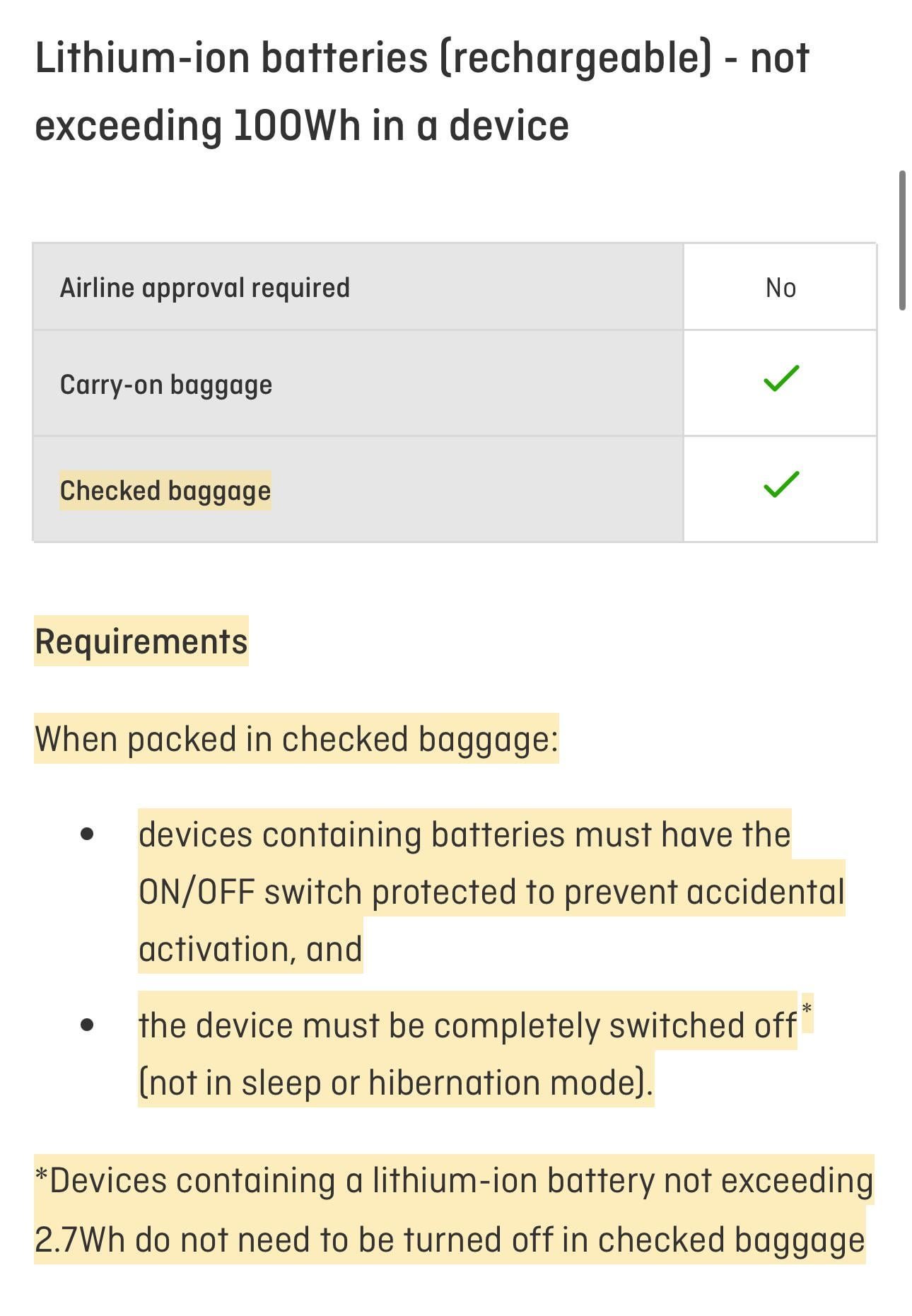
Lithium-ion batteries in laptops can catch fire if damaged. Pressure, heat, or punctures in checked bags increase this danger. Airlines often restrict or ban spare batteries in checked luggage.
Damaged batteries may overheat or leak toxic chemicals. Fires in cargo compartments are hard to control and very risky. Carrying laptops in carry-on bags reduces these safety hazards.
Alternatives To Checked Luggage For Laptops
Choosing how to travel with your laptop can be tricky, especially with airline rules and the risk of damage. Instead of checking your laptop in your luggage, there are smarter ways to keep it safe and accessible. Let’s look at some alternatives that protect your device and make your journey smoother.
Carry-on Advantages
Carrying your laptop in your carry-on bag keeps it within your reach throughout the trip. This way, you avoid the risk of rough handling or theft that sometimes happens with checked luggage.
Security checks are easier too. You can quickly remove and replace your laptop during screening without worrying about losing it or delaying your travel.
Have you ever needed your laptop mid-flight or during a layover? Carrying it on lets you work, watch shows, or stay connected without interruption. It’s a simple habit that saves a lot of hassle.
Using Protective Laptop Cases
A sturdy laptop case adds a crucial layer of protection, whether your laptop is in a backpack, briefcase, or carry-on. Look for cases with shock-absorbing materials and snug fits to prevent movement inside.
Some cases offer water resistance or extra padding around corners, which can be lifesavers if you face unexpected spills or drops. Investing in a good case means less worry about scratches or cracks.
Think about how often you handle your bag during travel—loading, unloading, sitting in cramped spaces. A protective case helps your laptop withstand all that daily wear and tear without damage.

Packing Tips For Traveling With Laptops
Traveling with a laptop requires careful packing. Laptops are delicate and expensive. Protecting them during travel helps avoid damage or loss. Follow simple tips to keep your device safe and ready to use.
Preparing Your Device
Turn off your laptop completely before packing. Avoid putting it in sleep mode or hibernation. Remove any accessories like USB drives or headphones. Use a padded laptop sleeve or case for extra protection. Place the laptop in the middle of your bag. Surround it with soft items like clothes to cushion impacts.
Securing Data And Backups
Backup important files before traveling. Use cloud storage or an external hard drive. Encrypt sensitive data to keep it safe. Set a strong password on your device. Activate tracking software in case of loss or theft. Keep your laptop’s software updated to fix security issues.
Exceptions And Special Cases
While the general rule advises against packing laptops in checked luggage, there are notable exceptions and special cases you should be aware of. Understanding these nuances can help you avoid unexpected hassles at the airport and keep your device safe during travel.
International Travel Rules
Different countries enforce varying regulations regarding laptops in checked bags. Some nations prohibit lithium-ion batteries in checked luggage due to fire risks, which impacts whether you can check your laptop.
For example, flights departing from the European Union usually require laptops to be carried in the cabin. Meanwhile, certain Middle Eastern carriers might allow laptops in checked bags but with strict battery removal policies.
Before packing, check the destination country's aviation authority website or your airline’s international travel guidelines. Have you ever faced a surprise ban on your laptop at customs? Knowing these rules can save you from last-minute repacking.
Airline-specific Exceptions
Airlines set their own rules on laptops in checked luggage, often based on safety protocols or aircraft type. Some budget airlines strictly forbid it, while full-service carriers may permit it under specific conditions.
For example, a few airlines allow laptops in checked bags if the battery is removed and carried separately in your hand luggage. Others might require the device to be fully powered off to avoid accidental activation during flight.
It’s smart to review your airline’s baggage policy before you pack. Have you ever double-checked your airline’s laptop rules only after arriving at the airport? Avoid the stress by confirming this detail early.
Frequently Asked Questions
Can I Pack A Laptop In Checked Luggage?
Yes, you can pack a laptop in checked luggage. However, it’s not recommended due to potential damage or theft risks during transit.
Are Laptops Allowed In Checked Baggage On Flights?
Most airlines allow laptops in checked baggage, but many advise carrying them in hand luggage for safety and security reasons.
What Are The Risks Of Checking Laptops In Luggage?
Laptops in checked luggage risk damage from rough handling and theft. Batteries may also pose fire hazards, leading to restrictions.
Should I Remove Batteries From Laptops In Checked Baggage?
Removing batteries is advised if you must check a laptop. Lithium batteries can be hazardous and are often restricted in checked bags.
Conclusion
Laptops usually should not go in checked luggage. Airlines and airports prefer you carry them in your hand luggage. This keeps your device safe from damage or theft. Batteries in laptops can cause safety risks in the cargo hold. Carrying laptops with you also makes security checks easier.
To avoid problems, pack your laptop in your carry-on bag. Check airline rules before traveling to stay informed. Travel smart, and keep your laptop close during flights. Safe and simple.