

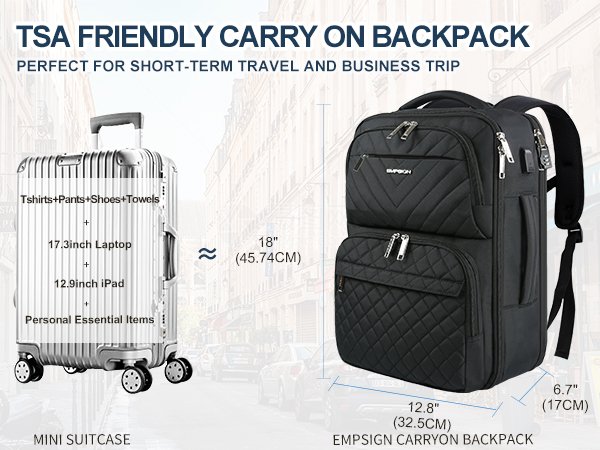
Are you planning a trip and wondering if your laptop case can be counted as a carry-on? You're not alone.
Many travelers, like you, are keen to make the most of their luggage allowance without any unexpected surprises at the airport. Understanding what qualifies as a carry-on can save you time, money, and stress. We'll unravel the mystery surrounding laptop cases and carry-on rules, ensuring you're well-prepared for your next adventure.
Stick around to discover the key tips that will help you fly with ease and confidence.
Carry-on Basics
Understanding carry-on basics helps travelers pack smarter. Airlines set rules about what counts as carry-on luggage. This includes size limits and what items fit on board. Knowing these rules avoids delays and extra fees at the airport.
Standard Carry-on Size Limits
Most airlines allow carry-on bags with dimensions near 22 x 14 x 9 inches. This size includes wheels and handles. Bags larger than this may need to be checked in. Weight limits usually range from 15 to 22 pounds. These limits keep overhead bins safe and manageable.
- Length: up to 22 inches
- Width: up to 14 inches
- Height: up to 9 inches
- Weight: generally under 22 pounds
Airline Variations In Policies
Each airline may set its own carry-on rules. Low-cost carriers often have stricter size and weight limits. Full-service airlines may allow bigger bags or extra personal items. Some airlines count a laptop case as a separate carry-on. Others require it to fit inside the main bag. Checking the airline’s website before packing saves trouble.

Laptop Case As Carry-on
Many travelers wonder if a laptop case counts as a carry-on bag during flights. Airlines often have strict rules on carry-on luggage size and quantity. Understanding how a laptop case fits into these rules helps avoid extra fees or delays. Knowing the details ensures a smoother trip and keeps your electronics safe.
When A Laptop Case Qualifies
A laptop case usually counts as a personal item, not a full carry-on. It must be small enough to fit under the seat in front of you. Most airlines allow one personal item plus one carry-on bag. The laptop case should hold only your laptop and a few accessories.
Check airline policies for exact size limits. Some allow laptop cases as an additional item if they meet size rules. Soft-sided cases often qualify better than bulky hard cases. Keep your laptop case compact and easy to carry.
Combining Laptop Case With Other Bags
You can bring a laptop case along with a carry-on suitcase. Airlines usually allow one carry-on bag plus one personal item. Your laptop case counts as the personal item in this case. Make sure the carry-on bag fits the airline’s size rules.
Try to pack light to avoid extra fees. If your laptop case is large, it might count as your main carry-on bag. Carry smaller accessories inside your laptop case to save space. Organizing your bags well helps you pass security faster.
Airport Security And Laptop Cases
Airport security often raises questions about how to handle laptop cases. Since laptops are considered electronics, they require special attention during screening. Understanding these procedures can help you move through security faster and avoid any unnecessary hassle.
Screening Procedures For Electronics
When you reach the security checkpoint, you’ll be asked to remove your laptop from its case. This allows the security officers to get a clear scan of the device without any interference from the bag. Laptop cases themselves typically go through the X-ray machine along with your other carry-on items.
Some airports have started using advanced scanners that allow laptops to stay inside the case. But this isn’t always guaranteed, so be prepared to take it out. Remember, the laptop counts as a separate item and doesn’t replace your allowed carry-on bag.
Tips For Quick Security Checks
- Organize your laptop case:Keep cords, chargers, and accessories neatly packed to avoid delays.
- Use a case with a separate laptop compartment:This makes it easier to remove the laptop quickly when asked.
- Stay alert:Watch for instructions from security staff and follow them promptly.
- Wear easy-to-remove shoes and limit metal objects:This speeds up the entire screening process.
Have you ever waited in a long security line only to realize you forgot to take your laptop out of the case? It’s a small step, but it can make a big difference. Being prepared and understanding the rules helps you move through security with less stress and more confidence.

Choosing The Right Laptop Case
Choosing the right laptop case matters for travel and daily use. It protects your device and fits airline carry-on rules. The right case balances size, weight, and protection for easy transport. Consider your laptop size and travel needs carefully. A good case can reduce damage risk and make security checks smoother.
Size And Weight Considerations
Pick a case that fits your laptop snugly. Too big means extra space that can cause damage. Too small means forced fit, which can also harm your laptop.
Check airline carry-on size limits before buying. Most airlines allow a small personal item plus a carry-on. Your laptop case should fit as a personal item or inside your carry-on bag.
Lightweight cases ease the load during travel. Heavy cases add weight and bulk. Choose materials that offer strength without heaviness.
Protective Features To Look For
Padding is key. Look for thick, shock-absorbing foam inside the case. It cushions against bumps and drops.
Water resistance helps protect your laptop from spills and rain. A case with a water-resistant outer layer is ideal.
Strong zippers and secure closures keep your laptop safe inside the case. Loose or weak closures risk your laptop slipping out.
Extra compartments for chargers and accessories add convenience. Keep cables and gadgets organized and easy to reach.
Packing Tips For Laptop Travelers
Traveling with a laptop means more than just packing the device itself. You need to think about how to keep your accessories organized and avoid carrying unnecessary weight. Smart packing can save you time at security checks and prevent frustration during your journey.
Organizing Accessories And Cables
Cables and accessories often get tangled or lost in your bag. Use a small pouch or dedicated organizer to keep chargers, adapters, and USB drives in one place. This not only saves space but also makes it easy to find what you need quickly.
Consider labeling your cables or using color-coded ties. This helps you grab the right charger without digging through your bag. Have you ever wasted minutes untangling a mess of wires at the airport? Keeping things tidy can avoid that hassle.
Avoiding Overpacking
It’s tempting to bring every gadget and accessory, but overpacking adds weight and stress. Ask yourself which items are essential for your trip and leave the rest behind. Lighter bags mean easier carry-ons and less worry about airline weight limits.
Think about your travel schedule and what you’ll realistically use. If you never use a certain adapter or extra mouse at home, do you really need it on your trip? Pack smart to keep your carry-on manageable and your travel experience smooth.

Airline-specific Guidelines
Airline-specific guidelines shape how laptop cases are treated as carry-ons. Each airline sets its own rules about carry-on size and the number of items allowed. These rules affect whether a laptop case counts as one carry-on or a personal item. Knowing these policies helps avoid confusion at the airport.
Major Airlines' Carry-on Policies
Major airlines often allow a laptop case as a personal item or part of the carry-on allowance. For example:
- American Airlines permits one carry-on plus one personal item, such as a laptop bag.
- Delta Airlines treats laptop cases as personal items if they fit under the seat.
- United Airlines allows a laptop case as an additional item if it fits size limits.
Size and weight limits vary, so checking airline websites before travel helps. Most major airlines focus on the total carry-on count, combining bags and laptop cases.
Low-cost Carriers And Laptop Cases
Low-cost carriers often have stricter rules about carry-ons. Many count a laptop case as part of the single allowed item. Some low-cost airlines charge extra for any additional bags beyond a small personal item.
- Ryanair usually includes a small personal bag, with laptop cases fitting this category.
- EasyJet requires passengers to buy priority boarding for larger carry-ons, including laptop cases.
- Spirit Airlines often charges for carry-ons beyond a personal item, which may include laptop bags.
Travelers should check low-cost carrier policies carefully to avoid extra fees. Laptop cases might need to fit under the seat or be combined with other personal items.
Extra Travel Tips
Traveling with a laptop case can be a bit tricky, especially when airlines have strict carry-on rules. Beyond just knowing if your laptop case counts as a carry-on, there are smart ways to handle your devices and keep your tech powered up. These extra travel tips will help you stay organized and ready for anything on your journey.
Handling Multiple Devices
Carrying more than one device means you need to plan carefully. Avoid juggling too many gadgets in your hands or stuffing them into one bag. Instead, use a dedicated laptop case with extra compartments for tablets, phones, and chargers. This keeps everything neat and easy to access during security checks.
Think about the times you’ve had to pull out a device quickly—was it frustrating? Having a well-organized laptop case can save you from that hassle. Also, consider the weight: packing multiple devices in one bag can make it heavy and uncomfortable. Could separating devices between your laptop case and your personal bag make your trip smoother?
Backup Power Solutions
Battery life can be your biggest enemy when traveling. Portable chargers or power banks are lifesavers, but not all airlines allow them in checked luggage. Carry these power sources in your laptop case or personal carry-on to avoid any issues at the gate.
Choose a power bank with enough capacity to charge your devices multiple times. I once ran out of battery halfway through a long layover, and having a fully charged power bank saved me from hours of downtime. Do you know the power limits airlines set for these devices? Checking this before you pack can prevent last-minute surprises.
Frequently Asked Questions
Does A Laptop Case Count As A Separate Carry-on Item?
No, a laptop case usually counts as a personal item, not a separate carry-on. Airlines allow one carry-on bag plus one personal item like a laptop case. Always check the airline’s specific rules to avoid extra fees.
Can I Bring A Laptop Case Inside The Airplane Cabin?
Yes, you can bring a laptop case inside the cabin. It is considered a personal item and fits under the seat. Ensure your laptop case meets size requirements for personal items to avoid checking it in.
Are There Size Limits For Laptop Cases On Flights?
Yes, laptop cases must fit within the airline’s personal item size limits. Most airlines allow small bags that fit under the seat. Check your airline’s policy to ensure your laptop case qualifies as a personal item.
Does A Laptop Case Need To Be Screened Separately At Security?
Yes, laptops must be removed from the case during security screening. This speeds up the process and prevents damage. Your laptop case itself goes through the X-ray machine along with other carry-on items.
Conclusion
A laptop case usually counts as a personal item, not a carry-on. Airlines often allow one personal item plus one carry-on bag. Your laptop case fits under the seat easily. This makes travel more convenient and organized. Always check your airline's rules before packing.
Knowing this helps avoid extra fees or delays. Travel smart and keep your laptop safe. Simple steps make your trip smoother and stress-free.